Product
How it works: AI coding session analytics, end to end
How Accrete's AI coding session analytics work: capture, sync, classification, the team adoption matrix, and coaching. Honest about what it doesn't do.
Accrete turns your team's real Claude Code sessions into something you can actually look at: who is doing what with the tools, which practices are spreading, and where people are stuck. This page walks the pipeline honestly — what runs where, what data moves, and what the system can and cannot see. The full data-handling detail lives on the privacy page; read that too.
1. Capture: a small client on each dev machine
Claude Code already writes a transcript of every session to the developer's machine. The catch: those transcripts purge after roughly 30 days, and nobody reads raw transcripts anyway.
Accrete's client parses those local transcripts into a durable local database on the same machine. Nothing leaves the laptop at this stage. The transcripts can purge on schedule; the parsed record survives.
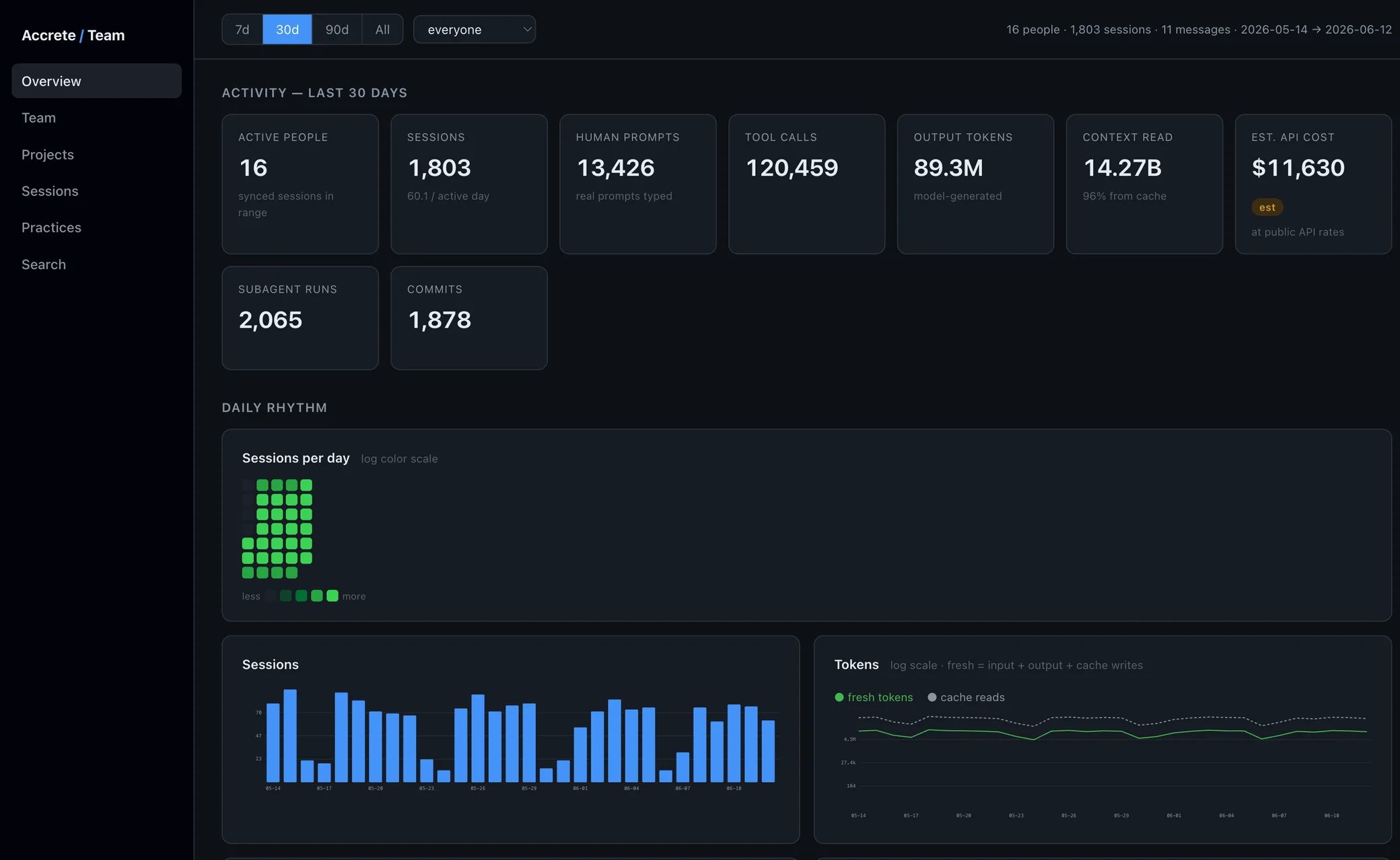
The developer gets something out of this immediately: the same explorer the team uses runs locally against their own database. They can see their own sessions, their own practice signals, their own history — before anything syncs anywhere. We built it for individual visibility first; the team layer came second.
2. Sync: parsed data to your team's server
On a schedule, the client pushes parsed session data — not raw transcript files — to your team's server over an authenticated connection. Each client holds a token; the server only accepts fields it knows about.
One isolated database per company. No cross-company pooling, no shared infrastructure between tenants, no org hierarchy to misconfigure. Your data sits in your database, full stop. The privacy page spells out exactly what's in a synced record and what never leaves the developer's machine.
3. Classification: making session data legible
Raw agent transcripts are mostly noise — tool output, file contents, agent-to-agent chatter. The signal is buried. At ingest, every transcript line is classified: actual human prompts versus tool output versus agent messages. Sessions attribute to the projects they belong to.
Then the pipeline detects practice signals — concrete, observable behaviors in the session:
- Planning before coding (plan mode)
- Delegating work to subagents
- Using skills and saved commands
- Task tracking
- Memory and context management
- Committing work
- Producing markdown artifacts (plans, docs, specs)
These aren't proxies or sentiment scores. Either a session shows the developer entering plan mode or it doesn't. That's what makes the data trustworthy enough to coach from — the case for measuring this way is in measuring AI coding impact.
4. The team view
The dashboard has three layers:
Activity — sessions over time, by person and by project. The baseline view of what's happening.
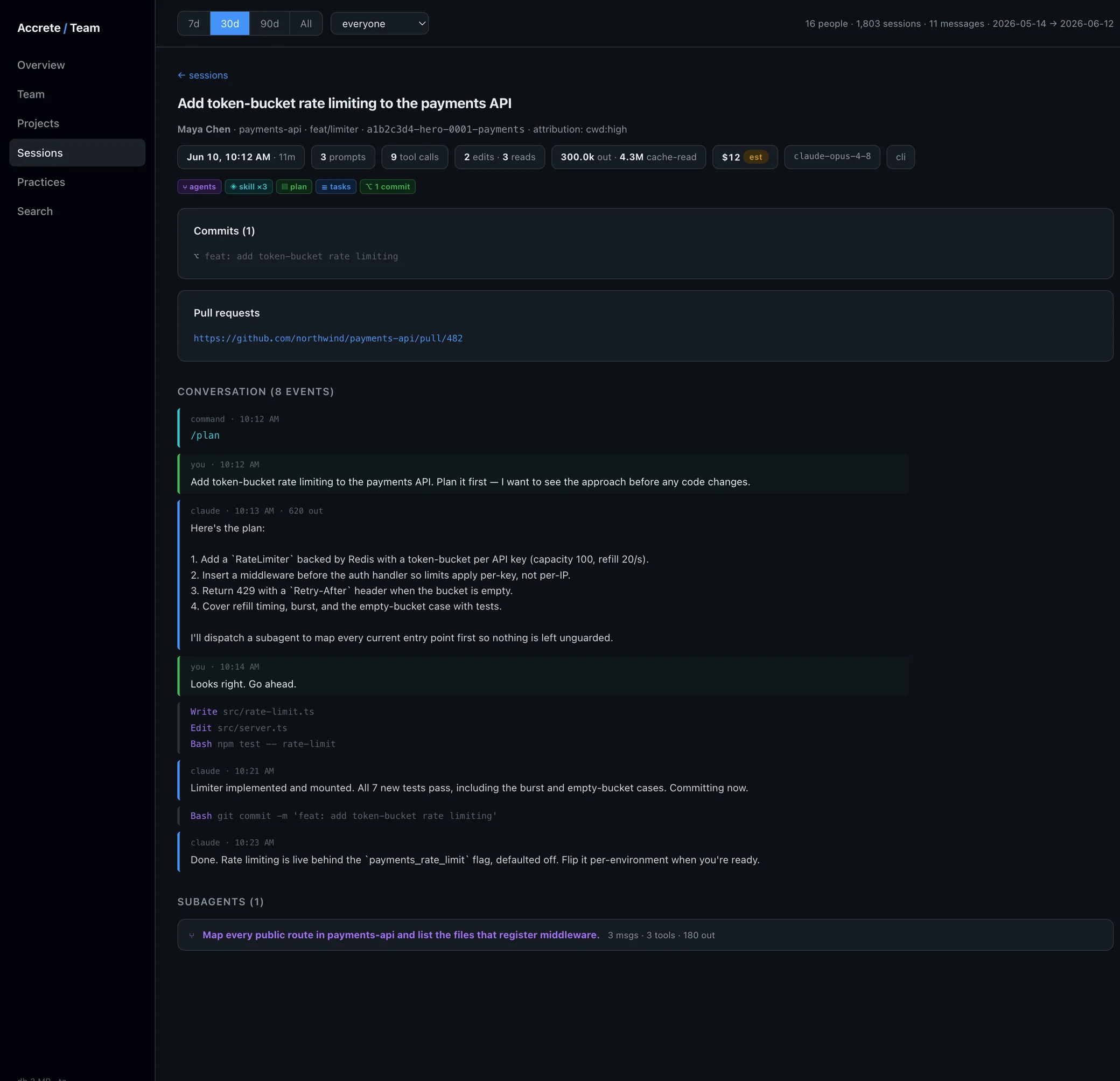
Session drill-down — open any session and see the classified record: the human prompts, what the agent did, which practice signals fired.
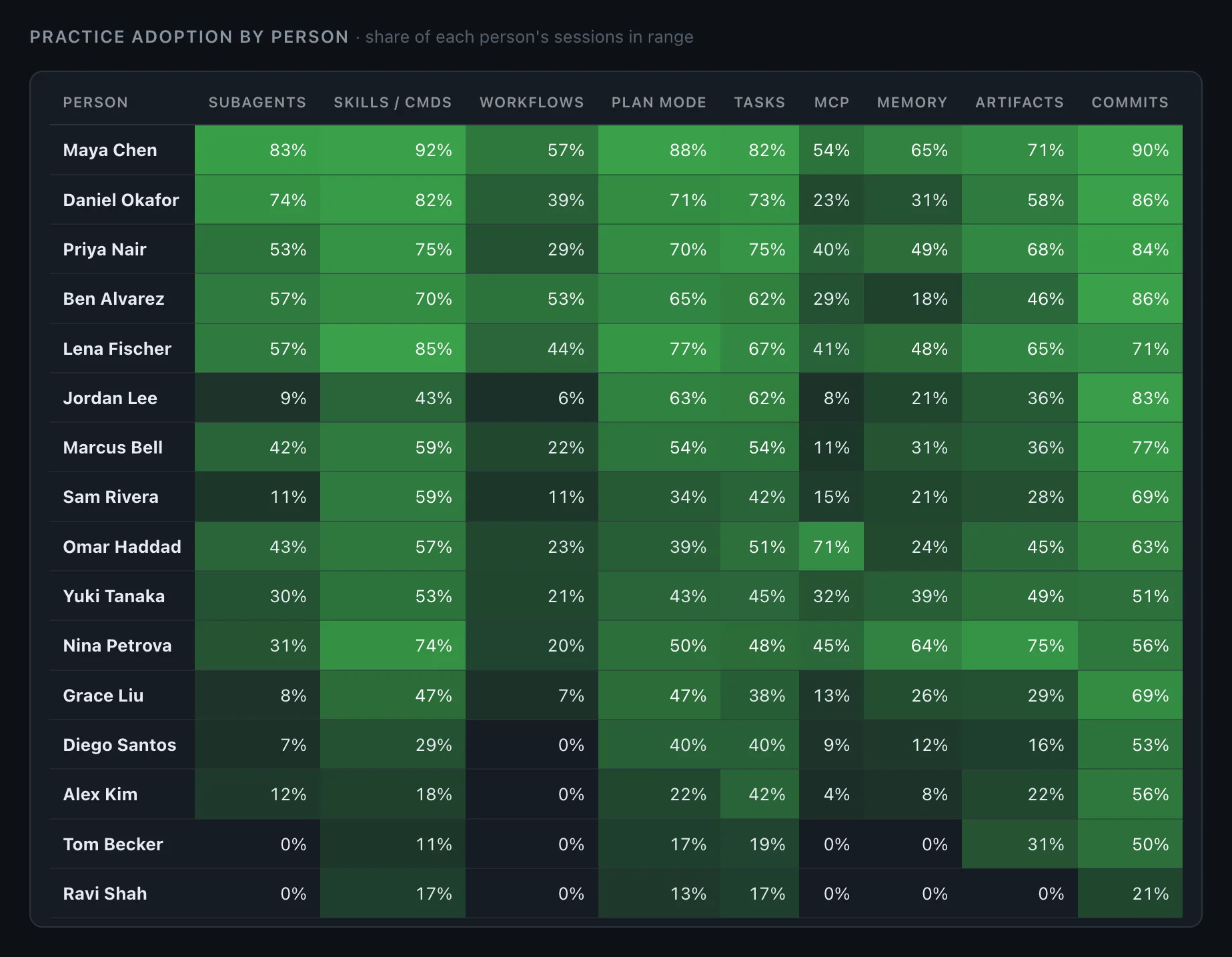
The adoption matrix — per-person × per-practice. Who has adopted which practices, who hasn't, where the team plateaus. A practice counts as adopted per session it appears in; volume of use is tracked separately. Adoption and proficiency are deliberately distinct, because "tried it once" and "uses it well" are different facts, and conflating them is how teams fool themselves.
There's also an LLM-written team catalog: a card per project summarizing what its recent sessions are about, so a lead can scan the team's actual work in a minute. The model reads structured digests of the classified data — not raw transcripts.
5. Coaching: what the data is for
The dashboard is not the product. The point is what you do with it.
The matrix shows you that your best results cluster around people who plan before coding and delegate to subagents — and that half the team has never done either. That's a coaching agenda, not a chart. How that works in practice is on coach your team.
What it doesn't do
Worth being plain about:
- No keystroke surveillance. We parse agent session transcripts. We don't watch screens, log keys, or track time.
- No leaderboard theater. The adoption matrix is for finding coaching opportunities and unnoticed expertise, not ranking developers for performance reviews.
- It doesn't grade code quality. It observes practices in sessions. Whether the code is good is your review process's job.
- It only sees Claude Code and agent sessions. IDE autocomplete tools like Copilot's inline suggestions don't produce session transcripts; they're invisible to us.
How hard is this to deploy?
Honestly, not very. Each developer runs one CLI init command with a token from your server. After that, sync runs in the background. There's no IDE plugin, no proxy, no change to how anyone works — the client reads transcripts Claude Code already writes. More operational questions are answered on the FAQ.
See it on your own team's sessions
We're pre-launch, working with a small set of teams. Join the early access list — or if you want to work directly with the founder and shape the practice catalog, ask about becoming a design partner when you sign up.